

What You’ll Learn
- Whether TemplateByCapCut.com is a legitimate, safe website to use — and what to watch for
- Exactly how CapCut template links work and why they always open inside the official CapCut app
- The difference between this site and the official CapCut platform
- How to find and use trending templates without downloading anything sketchy
- Red flags to avoid on any third-party CapCut template site
Introduction
TemplateByCapCut.com is a third-party website that collects and shares trending CapCut video template links in one place — it is not an official CapCut product.
The site was built to solve a common frustration: finding viral CapCut templates scattered across TikTok, Instagram, and YouTube, with no central hub to browse them. TemplateByCapCut.com aggregates those template links and organizes them so you can browse categories, preview what a template looks like, and tap directly into CapCut to start editing.
According to the site’s own About page, it is “not an official partner of CapCut or ByteDance” and all templates are sourced from public CapCut content. The site targets content creators, short-form video editors, and social media users who want to save time finding trending templates.
If you use CapCut regularly to create TikTok Reels, Instagram clips, or YouTube Shorts, this site is designed for you. It’s especially popular in India, Pakistan, and among global English-speaking audiences looking for music-synced and effects-heavy templates.
Is TemplateByCapCut.com Safe to Use?
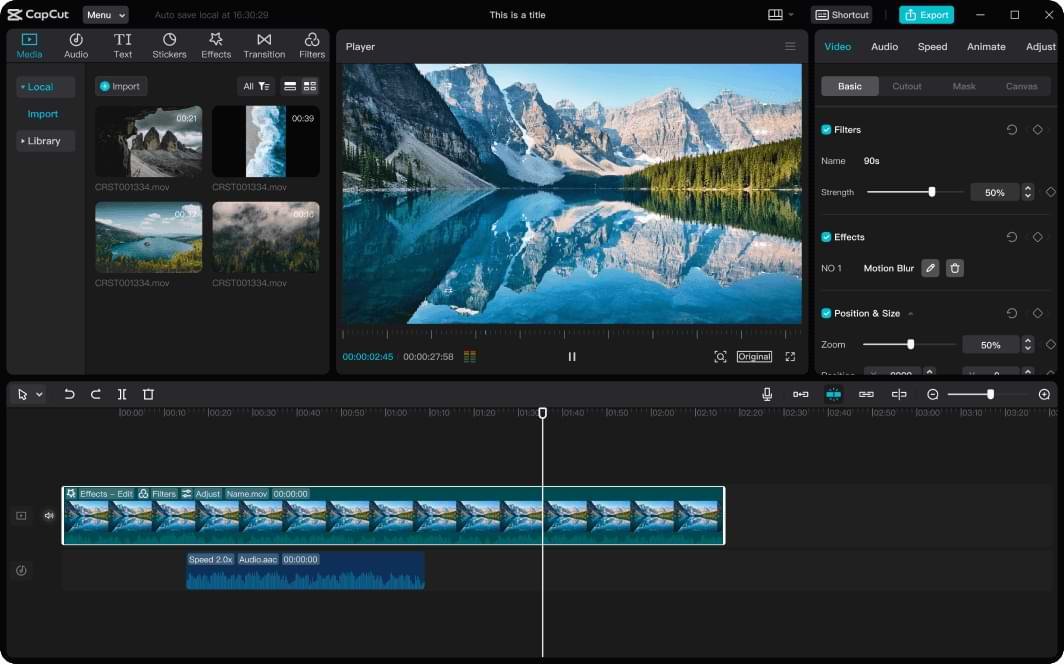
Yes, TemplateByCapCut.com appears safe for general use — the site itself doesn’t host any software downloads, and template links redirect users directly into the official CapCut app.
There are no reported instances of the site distributing malware, embedding phishing forms, or attempting to collect personal data. Because template links open inside CapCut (not a third-party installer), the risk profile is much lower than sites that offer APK downloads or modified apps.
That said, there are a few things worth knowing:
- The site is ad-supported. Like most free content sites, it displays ads. Some ad networks can occasionally serve pop-up style ads that feel aggressive. This is a minor annoyance, not a security threat.
- It is not affiliated with CapCut or ByteDance. No endorsement, partnership, or official relationship exists. The templates it shares are public CapCut links — anyone can share those.
- Your actual video editing happens inside CapCut. Once you click a template link, all data handling, privacy, and storage fall under CapCut’s own terms of service — not this site’s.
The main risk isn’t the third-party site itself. It’s worth being aware that CapCut’s June 2025 Terms of Service update granted ByteDance broad, perpetual rights to uploaded content — including private drafts. That’s a CapCut-level consideration, not specific to TemplateByCapCut.com.
Bottom line: The site is a directory of public links, not a software provider. It’s safe to browse, provided you stay alert to ad behavior and understand you’re clicking into CapCut’s ecosystem.
How Do CapCut Template Links Actually Work?
A CapCut template link is a deep link — a URL that opens a specific template inside the CapCut app, not a file you download to your device.
Here’s exactly what happens when you click a template link on TemplateByCapCut.com (or any site sharing CapCut templates):
- You tap or click the “Use Template” button on the site.
- Your browser passes a deep link URL to your phone’s operating system.
- If CapCut is installed, the app opens directly to that template’s edit screen.
- You select your own photos or videos to slot into the template.
- CapCut applies the pre-built transitions, music, effects, and timing.
- You export and share.
No files are transferred from the third-party website to your device during this process. The template itself lives inside CapCut’s servers. The website is simply a catalog that points to those links — similar to how a restaurant review site links to a restaurant’s reservation page without handling the actual booking.
This architecture is actually what makes third-party template aggregator sites both functional and relatively low-risk. The heavy lifting is always done inside CapCut’s official environment.
What Templates Can You Find on the Site?
TemplateByCapCut.com focuses heavily on trending and music-synced templates, with a strong catalog of Bollywood, Punjabi, and international pop-aligned edits that go viral on Instagram and TikTok.
Based on the site’s active content, popular categories include:
- Beat-sync templates — videos that cut to music drops, typically 15–30 seconds
- Photo slideshow templates — smooth transitions between 3–10 photos with aesthetic filters
- Trending audio templates — templates built around currently viral sounds
- Name/text overlay templates — personalized edits with animated name or caption effects
- Reels-ready vertical templates — pre-formatted for 9:16 Instagram Reels and TikTok
The site updates regularly with templates tied to trending songs and moments — templates like “Hornn Blow,” “Daru Badnaam,” “Made In India,” and similar Punjabi and Hindi-language viral edits appear prominently in the catalog.
If you’re creating content for a South Asian audience or want to match a specific trending sound, the site’s library is particularly deep in that space. For users in the US, UK, Canada, and Australia looking for globally trending templates, browsing by “New” or “Trending” is the most efficient approach.
How Does TemplateByCapCut.com Compare to the Official CapCut App?
TemplateByCapCut.com is a discovery tool, not an editor — it helps you find templates faster, but all actual video creation happens inside the official CapCut app.
Here’s a clear comparison:
| Feature | TemplateByCapCut.com | Official CapCut App |
|---|---|---|
| Browse templates | ✅ Yes — curated, categorized | ✅ Yes — full library, search |
| Edit videos | ❌ No | ✅ Full editor |
| Download templates | ❌ No — links open CapCut | ✅ Via deep link |
| Account required | ❌ No | ✅ Required to edit |
| Affiliated with ByteDance | ❌ No | ✅ Yes — official product |
| Cost | Free (ad-supported) | Free / Paid tiers |
The official CapCut app at capcut.com is always the authoritative source for templates. Its built-in template browser lets you search by keyword, category, and trending status. The advantage of third-party directories like TemplateByCapCut.com is discoverability — they surface trending templates with context and previews that make browsing faster, especially on mobile.
One caveat specific to US users: CapCut’s availability in the United States has been uncertain following legislative actions in early 2025. Users in affected regions may face app access limitations regardless of which site they use to discover templates.
What Are the Red Flags to Watch for on Third-Party Template Sites?
The biggest red flags on any CapCut template site are: requests to download APK files, prompts to enter personal information, or “Use Template” buttons that don’t open the CapCut app.
Legitimate template sites don’t need you to install anything. The template link should take you straight to CapCut — nothing else. Here’s what to avoid:
Download requests: If a site asks you to download an APK, EXE, or any installer file to “access templates,” leave immediately. Official CapCut templates never require a separate download. Security guidance consistently warns that third-party APK mirrors frequently bundle adware, spyware, or modified software.
Login prompts on the third-party site itself: You should never need to log into your CapCut or TikTok account on a third-party site. Your account credentials belong only on capcut.com or the official app.
Pop-ups claiming your device has a virus: These are standard ad-network scare tactics. Close the tab and revisit with an ad blocker enabled if this happens frequently.
Links that open to an unknown website instead of CapCut: A real template deep link opens the CapCut app or directs to capcut.com. If the button redirects you somewhere else entirely, treat that as a potential phishing attempt.
TemplateByCapCut.com doesn’t display these warning signs based on available information. But these rules apply universally to any third-party CapCut directory you encounter.
How Do You Use a CapCut Template From This Site?
Using a template from TemplateByCapCut.com takes under two minutes — browse the site, tap “Use Template,” and CapCut opens with the template ready to edit.
Here’s the exact process, step by step:
Step 1 — Make sure CapCut is installed. The template link needs CapCut on your device to work. Download it from the official App Store or Google Play if you haven’t already.
Step 2 — Find a template you like. Browse TemplateByCapCut.com by category or check the “Trending” section. Most template pages include a short preview so you know what the finished edit looks like.
Step 3 — Tap “Use Template.” This fires the deep link. Your phone will ask if you want to open the link in CapCut — confirm.
Step 4 — Select your media. CapCut will prompt you to choose photos or video clips from your camera roll. The template tells you exactly how many clips it needs.
Step 5 — Export your video. Hit export, choose your quality settings, and save to your gallery. You can share directly to TikTok, Instagram, or anywhere else.
The whole process from finding a template to having a finished video is typically under five minutes for a beginner. That speed is exactly why template-based editing has become the dominant workflow for short-form content creators.
Are There Better Alternatives?
The best alternatives to TemplateByCapCut.com are the official CapCut template browser, OGTemplate.com, and CapCutTemplate.Download — each offering similar functionality with slightly different content focuses.
Here’s a quick comparison:
Official CapCut Template Library : The most complete and up-to-date source. Every template available anywhere originates here. The downside is discoverability — you need to know what you’re searching for, and the browsing experience inside the app is less organized than a dedicated directory site.
OGTemplate.com: A direct competitor to TemplateByCapCut.com with a similar catalog and clean layout. Covers global trending templates and allows template submission from creators. Good for US and global audiences.
CapCutTemplate.Download: Another legitimate third-party directory. Stronger on documentation — each template page includes usage steps and notes. Less focused on South Asian and Bollywood content than TemplateByCapCut.com.
Choosing between them: If you’re creating content aimed at South Asian audiences or following Punjabi and Hindi music trends, TemplateByCapCut.com’s catalog is notably strong. For global trending templates, the official CapCut app’s built-in browser gives you the most current results.
FAQs
Q: Is TemplateByCapCut.com the official CapCut website?
No — TemplateByCapCut.com is a third-party directory site with no official affiliation with CapCut or ByteDance. The official CapCut platform is at capcut.com. TemplateByCapCut.com describes itself as an independent resource that shares publicly available template links to help creators find trending content more easily.
Q: Do I need to create an account on TemplateByCapCut.com to use templates?
No — you can browse and access template links on the site without creating any account or providing personal information. The only account you need is a CapCut or TikTok account, which you’ll use directly inside the CapCut app when you open the template link.
Q: Are the templates on TemplateByCapCut.com free?
Yes — the template links shared on the site point to free public CapCut templates. Using a CapCut template to edit your video is free within CapCut’s free tier. Note that some CapCut features used in more complex templates (like certain AI effects) may require a paid CapCut subscription.
Q: Can I get a virus from clicking a template link on TemplateByCapCut.com?
Clicking a standard template deep link does not install any software or expose you to malware, because the link opens inside your existing CapCut app. The risk to watch for is aggressive ad behavior on the page — never click pop-up ads or download prompts. If a button asks you to install a file, that is not a template link.
Q: Why won’t the template link open on my phone?
Template links require the CapCut app to be installed and up to date. If the link doesn’t open, check that CapCut is installed from the official App Store or Google Play, update to the latest version, and try tapping the link again. In some regions with CapCut access restrictions, a VPN set to a supported country may be required.
Q: Does TemplateByCapCut.com collect my personal data?
Based on the site’s published privacy policy, the site operates as a standard WordPress-based blog with typical analytics tracking (similar to most websites). No CapCut account data, video content, or sensitive personal information passes through the site — all of that stays within CapCut’s own systems when you edit a template.
Q: Is CapCut itself safe to use in 2026?
CapCut is free of known malware and passes App Store and Google Play security standards. The main concerns users raise involve CapCut’s updated 2025 Terms of Service, which grant ByteDance broad, perpetual rights to use uploaded content, and ongoing questions about US availability following legislative restrictions introduced in early 2025. These are CapCut-level considerations, unrelated to TemplateByCapCut.com.
Q: Are the template links on this site up to date?
Template availability depends on whether the original creator has kept the template active inside CapCut. Third-party directories can’t control whether a template is removed by its creator. If a specific link doesn’t work, the template may have been taken down. The best fallback is searching directly inside the CapCut app’s template browser.
Q: How do I find the most viral CapCut templates right now?
The fastest way is to browse the “Trending” or “New” sections on TemplateByCapCut.com, OGTemplate.com, or the CapCut app’s built-in template browser. Templates tied to currently trending sounds on TikTok or Instagram Reels tend to gain traction fastest — so cross-checking what audio is trending on those platforms is a useful signal.
Conclusion
TemplateByCapCut.com is a legitimate, independently run directory that makes finding trending CapCut templates faster and easier. It doesn’t host downloads, doesn’t require your personal information, and doesn’t process your video content — all of that happens inside the official CapCut app once you click a template link.
Four things to take away from this review:
- The site is safe to browse, though you should ignore any aggressive pop-up ads and never download files from it.
- It is not affiliated with CapCut or ByteDance — it’s a community resource, not an official product.
- All template editing and data handling happen within CapCut’s own ecosystem, so CapCut’s own privacy terms are what actually govern your content.
- For US users, CapCut’s uncertain availability is the bigger practical consideration than the safety of any template discovery site.
If you’re a CapCut user who wants to spend less time hunting for templates and more time creating, TemplateByCapCut.com is a useful starting point. Head over, find a template that fits your vision, and open it directly in CapCut to start editing.
