

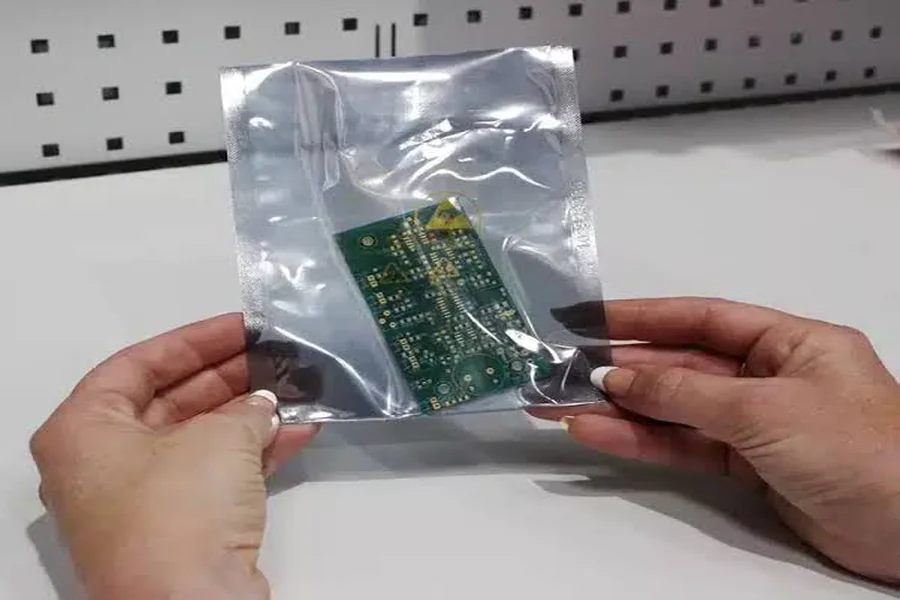
Electronic components require careful handling during storage, packaging, and transportation. Electrostatic discharge (ESD) protective bags help reduce the risk of electrostatic damage, while labels make it easier to identify components and maintain accurate inventory records. However, choosing the wrong label or applying it incorrectly can interfere with packaging integrity and established handling procedures.
A reliable labeling process involves more than selecting a suitable size. Material compatibility, adhesive performance, barcode readability, printer configuration, and traceability requirements all play important roles. Understanding these factors helps businesses choose labeling solutions that support efficient operations without compromising protective packaging.
Understand the Purpose of ESD Bag Labels
Labels provide essential information about the components stored inside protective bags. Depending on the facility’s workflow, they may display a part number, batch identifier, quantity, storage status, or barcode.
For this application, compare ESD bag labels on the actual static-shielding and antistatic electronic component bags and through the planned handling interval. Ask for samples before choosing a full production roll.
Before selecting a label, determine which information workers need to access during receiving, storage, assembly, and shipping. Keep the printed content concise and readable, and store detailed handling histories in the inventory management system when appropriate.
It is also important to distinguish between a label that adheres to an ESD bag and a labeling material that has been qualified for a specific ESD-controlled application. Adhesion alone does not demonstrate that a label is electrically suitable for the intended environment. Follow the facility’s ESD control requirements when selecting both materials and application methods.
Protect the Integrity of the Packaging
The primary purpose of an ESD protective bag is to protect its contents according to the bag’s design and specified use. Labeling should not interfere with that function.
Apply labels to an approved, flat exterior area and avoid heat-sealed edges, openings, folds, and inspection windows. These areas may be important for maintaining the seal, inspecting the contents, or opening the package safely.
When a component moves from one bag to another, verify its identity and update the associated inventory record before producing a replacement label. Inspect the packaging to ensure it remains suitable for use.
A correctly printed label is only useful when the package itself remains intact and the identification matches the actual component.
Choose Adhesives That Match the Bag Material
ESD bags are available in different constructions, including static-shielding and antistatic materials. Their outer surfaces may differ, which means an adhesive that performs well on one bag may not work equally well on another.
Test proposed labels on the actual bag material supplied for production. Apply them under normal workplace conditions and inspect their performance after the expected bonding period, storage, and routine handling.
During testing, check for peeling, edge lifting, adhesive residue, and damage to the bag during removal. An adhesive that creates a strong bond may not be appropriate if the label must later be removed without affecting the packaging.
If direct application does not meet the facility’s requirements, consider labeling an outer carton or using an approved external identification tag. Have the responsible ESD control personnel review the proposed method before implementation.
Keep Identification and Traceability Clear
A useful label should help workers identify the correct component without unnecessary searching. Part numbers, lot identifiers, quantities, and handling statuses are common fields, although the exact requirements depend on the application.
Barcode placement also deserves attention. If a package contains several barcodes, establish which code is intended for receiving, inventory, or production scanning. Ensure the printed identifier corresponds to the correct digital record.
Do not assume that an external bag label replaces manufacturer markings on a component, reel, or other original packaging. Where those markings are required, preserve them and maintain the relationship between the component and its associated records.
Clear identification reduces the risk of selecting the wrong item, scanning an outdated code, or recording an incorrect quantity.
Select Labels Compatible With the Printer
Label dimensions are only one part of printer compatibility. Before ordering, confirm the printer’s supported print width, label height, sensing method, roll core diameter, maximum roll diameter, and winding direction.
The label’s gap or black-mark configuration must also match the printer’s sensing system. Even labels with identical face dimensions can feed incorrectly if their roll construction differs from the printer’s requirements.
Run samples through the intended printer using the actual production template. A longer test run can reveal feeding inconsistencies, alignment drift, adhesive leakage, and variations in the die-cut edges.
Record the approved printer settings alongside the material specification. Revalidate the setup whenever the printer, label supplier, or template changes.
Design Barcodes for Reliable Scanning
Barcode quality affects how quickly workers can identify and process packaged components. A barcode should be designed for the scanners, scanning distances, and working conditions used in the facility.
Maintain adequate contrast, appropriate barcode dimensions, and the required clear margins around the code. Keep the barcode away from folds, seams, edges, and other areas where handling may distort the printed pattern.
Include a human-readable identifier so staff can visually check the information if a scan fails or returns an unexpected result.
Testing should include the smallest label size and the longest expected data value. This helps identify formatting problems before labels enter routine production. Verify readability at the actual receiving and storage stations rather than relying exclusively on a desktop inspection.
Apply Labels at a Consistent Location
A standardized placement process helps workers locate identification quickly and reduces variation between packages.
Choose a flat exterior panel that does not cross the heat seal or interfere with normal handling. Apply the label when the bag or package is in its intended working configuration.
Where permitted, ensure the application area is free of loose dust and moisture. Press the label evenly and inspect the corners and edges for lifting.
Provide workers with a placement guide that identifies approved areas and restricted zones. If packaging materials differ between suppliers or production batches, inspect representative samples before continuing with the full labeling run.
Consistent placement makes identification easier while helping preserve the intended function of the protective bag.
Establish Procedures for Opened and Resealed Bags
Opening a protective bag may change the package’s status or require a new seal, depending on the component and facility procedures. The labeling system should reflect these changes accurately.
Follow the approved resealing or replacement process and update the inventory record whenever the package status changes. Avoid writing over old labels or leaving several conflicting instructions visible.
If the component quantity changes, verify the physical count before generating a replacement label. The new label should come from the current, validated inventory record rather than an outdated print file.
These controls help maintain accurate information throughout storage, internal transfers, and transportation.
Control Label Reprints and Corrections
Damaged labels, incorrect templates, and changes to inventory records require a defined correction process. Workers should know who can authorize a replacement and how the old identification is handled.
Generate replacement labels from the verified current record. Do not recreate unique identifiers from memory or rely on a photograph of an earlier label.
Where the tracking system supports it, mark failed prints as void and retain the appropriate audit history. Remove or deactivate obsolete labels and codes so that scanners cannot accidentally select outdated information.
If the physical component does not match the digital record, resolve the discrepancy before issuing a replacement label. This prevents an incorrect identification from becoming part of the permanent inventory history.
Test Labels Under Real Operating Conditions
A successful initial print does not guarantee reliable performance throughout storage and transportation. A practical qualification test should reflect the actual environment in which the labels will be used.
Start with production label samples and the intended printer. Apply them to the most challenging approved bag material and evaluate them throughout the expected handling interval.
Check print quality, feed consistency, adhesion, edge lifting, removal behavior where relevant, and barcode readability at each important handoff. Record the test conditions and retain representative successful and failed samples.
If a test fails, change one variable at a time, such as adhesive, placement, label dimensions, or printer settings. This makes it easier to identify the cause and establish a repeatable solution.
The facility’s ESD control requirements should remain part of the approval process, especially when a proposed label or applicator could affect the packaging or handling procedure.
Provide Suppliers With Complete Specifications
Suppliers can recommend more suitable labeling materials when they understand the full application. Instead of providing dimensions alone, share the actual bag material, printer model, label drawing, roll configuration, barcode requirements, expected service life, and relevant storage and handling conditions.
Request samples of the proposed label construction before placing a large order. Agree on acceptance criteria in advance, including printing performance, scanning success, adhesion after routine handling, and removal behavior where applicable.
Record the approved face material, adhesive, liner, die-cut dimensions, and winding direction in a controlled specification. When a supplier changes a material or manufacturing process, determine whether additional testing is necessary.
For purchasing decisions, compare the cost per successfully labeled package rather than focusing exclusively on the price of a blank roll. Reliable performance can help reduce reprints, wasted materials, identification errors, and production interruptions.
Final Thoughts
Choosing labels for ESD protective bags requires a balanced approach to packaging integrity, adhesive compatibility, traceability, printing, and scanning. The most appropriate solution is one that meets the facility’s ESD control requirements while remaining readable and reliable throughout the intended handling period.
Before approving a label for production, test it on the actual bag material, confirm printer compatibility, verify barcode performance, and establish procedures for reprints and resealing. Clear supplier specifications and documented acceptance tests can make the process more consistent and easier to manage.
When evaluating direct thermal labels for ESD protective bags, provide the supplier with the actual bag surface, printer specifications, and performance acceptance criteria rather than selecting labels based on dimensions alone.
